


Goals
Site owners can configure their interfaces to achieve the following goals:
Express their own visual identity.
Communicate clearly their message.
Maintain visual consistency.
Concepts
Distribution
Custom Themes, Templates, and Blocks can be distributed together or independently and will be distributed on the Hypermedia network.
The site owner can mix and match Themes, Templates, and Blocks from different sources.
Blocks
A document is a list of nested blocks. Blocks form a Document. Blocks are responsible for rendering content. Blocks are components that render content from the document. They are intimately connected with the editor; thus, new blocks need to be compatible with the editor.
Views
Different Views of the blocks hierarchy give different document content.
Themes
Purpose: apply a visual consistency across the whole site
Header and footer layout, colors, fonts, spacing tokens
Can reccommend some layouts, but it works with all layouts
Customizing visuals is done through block component tokens.
Templates
Purpose: Give a structure/skeleton to a single page
Accepts variables from the theme: colors, fonts, layout tokens
Blocks pre-generated.
Interface Componentes
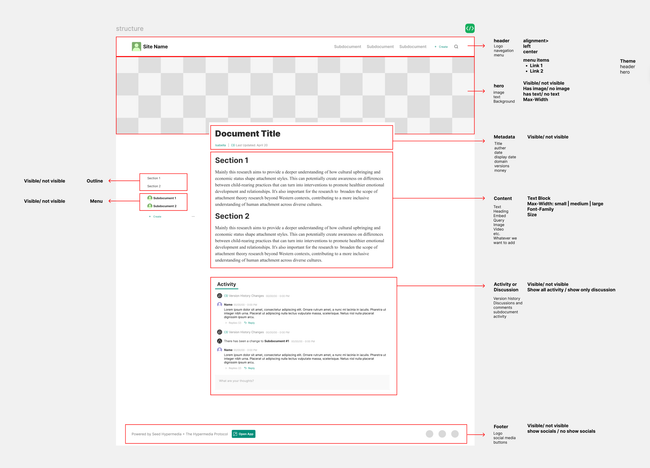
Protocol Implementation
Document properties doesn't cascade into child documents. Theme properties are cascaded into child document themes and can overwritten by children properties.
Do we want the same experience on the Web and Seed Browser? No.
Body
Body represents the Publication Box.
Document Model
Document Structure
Name
Icon
Content
Content is the core data and hypertext structure of the document.
BlockNode
Blocks
Blocks have properties.
Columns will be part of the lists, the same as we have children type.
Navigation
Navigation helps navigation the Site.
Theming
Local Theme
Doesn't cascade to children documents.
Theme
Properties included in this entity will cascade to the children document theme.
Document Model
{ // Document Snapshot:
  name: string,
  icon: IPFS URL,
  logo: IPFS URL,
  content: BlockNode[]
  navigation: {
    children: BlockNode[],
    display: 'header' | 'sidebar',
    }
  outline: {
    display: 'none' | 'left' | 'right'
  }
  // future
  appendix: AppendixBlockNode // singleton block
  //
  theme: {
    Site: {
      headerAlignment: 'left' | 'center',
      showOutline: boolean,
      contentMaxWidth: 'S' | 'M' | 'L',
      // future
      color: {
        accent: "Seed/brand",
        warning: "Seed/orange",
        danger: "Seed/red",
        default: "Seed/black"
      },
      fontSize: {
        text: 'S' | 'M' | 'L',
        heading: 'S' | 'M' | 'L',
      },
      fontFamily: {
        text: "Times", // or "body"
        heading: "Inter"
      },
    Document: {
      showOutline: boolean,
      contentMaxWidth: 'S' | 'M' | 'L',
  }
    Block: {
      type: 'featured',
  }
}
Example
A site wants an Outline on the child document but not on the home.
dailyplanet.io
{ // Document Snapshot:
  name: Daily Planet,
  icon: 32098432,
  logo: IPFS URL,
  localTheme: {
    showOutline: false,
    contentMaxWidth: 'M',
  }
  Theme: {
    headerAlignment: 'left' | 'center',
  }
dailyplanet.io/batman
{ // Document Snapshot:
  name: string,
  icon: IPFS URL,
  logo: IPFS URL,
  localTheme: {
    showOutline: false,
    contentMaxWidth: 'M',
  }
Do you like what you are reading? Subscribe to receive updates.
Unsubscribe anytime